
Stand up Somewear Core on a single Linux server, running Postgres, Redis, and the Core service as Docker containers. It’s the fastest path to a working self-hosted deployment, and a good fit for a lightweight, low-maintenance install.
What you’ll need
- One server running Linux, with:
- 4 CPU cores
- 16 GB RAM
- 40 GB disk storage
- An API token issued by Somewear Labs
- Root or sudo access on the server
Architecture
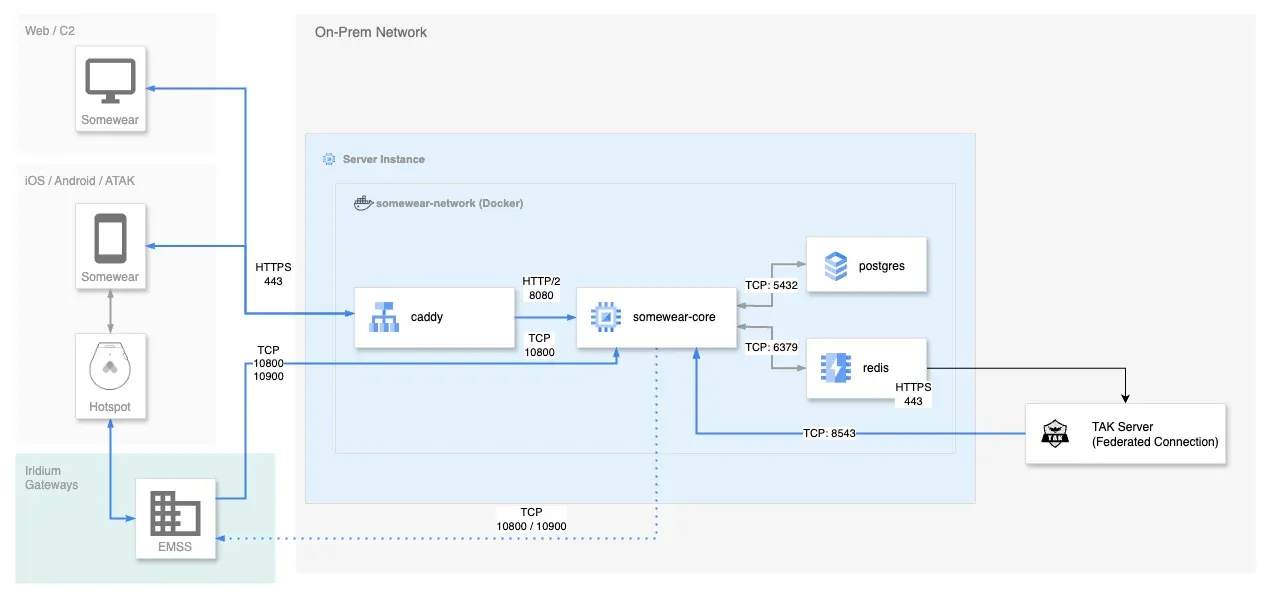
Install the Pilot CLI
Run the installation script on your server:
curl -sSL https://get.somewear.app/core/install.sh | bashThis installs the Pilot CLI, creates a pilot system user to run it, and lays down the configuration files Pilot needs.
Initialize the configuration
-
Switch to the
pilotuser:sudo su - pilot -
Run the init command:
pilot init
pilot init is interactive — enter the API key from Somewear Labs, the DNS address for this install, and credentials for a system admin account. A run looks like this:
Creating new Pilot configuration file at ~/.config/somewear/pilot.properties...Enter a value for each propertyapi-key (Pilot API key provided by Somewear Labs): <REDACTED_API_TOKEN>api-address (Web address for the api server. i.e. api.somewear.co): somewear.example.org
Configuration file created.Creating new Somewear core configuration file at ~/.somewear/pilot/core/somewear.conf...Enter a value for each propertyWEB_APP_URL (Web address URL for the server. i.e. https://api.somewear.co): https://somewear.example.orgSOMEWEAR_IDENTITIES_TO_CREATE (Somewear system admin account (formatted as username:password)): somewear:P@ssw0rd
Configuration file created.
Generate the Docker Compose file
Run:
pilot node docker-prepareThis generates the docker-compose.yml file Docker needs to run the Somewear Core service.
Start the services
Run:
docker compose up -dDocker starts Postgres and Redis first, then the Somewear Core service — all as containers on this one host.
Verify the install
Follow the Core service’s container logs to confirm it started cleanly:
docker logs -f somewear-coreOnce the logs settle with no errors, sign in at the WEB_APP_URL you set during pilot init, using the admin credentials from SOMEWEAR_IDENTITIES_TO_CREATE.